December Adventure Log 2025

Curious about what December Adventure is? Learn about December Adventure here.

Table of Weeks

Day 0

Woah, tomorrow's December! Let's take a look at what projects I have laying around, and figure out some hopefully low-key goals.

  • Extend my isometric arc calculator and get it complete enough to put online.
  • Write another exporter for mml-rhythm-cli?
  • Possibly lightly revamp quick-static-webcomic.

I tend to go where the wind takes me, so anywhere from all or none of this could end up happening. At the very least, I'll have fun doing coding every day!

Day 1

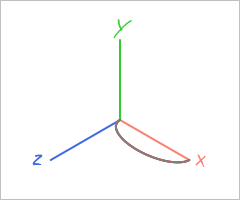
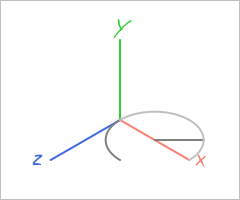
Today I did some poking around at my isometric arc calculator. The 'horizontal_plane' function can generate arcs in the x-z plane, but the radii are fixed pointing vertically and horizontally - that is, 45° (in the isometric world; it's 30° in the visual plane) off from the axes. I intend to replace it, so I made this test case of basic features with the old function to serve as a baseline.

A semicircle and a fourth of a circle projected into isometric perspective.

I figured that my 'cplane' function (I've forgotten what the 'c' stood for), being able to generate arcs in any orientation as long as one of the radii lives on the x-z plane, could be tweaked to fully replace hplane pretty easily. I now know that it won't be so simple.

While cplane can replace horizontal_plane when the radii form a circle, as soon as we enter the world of ellipses, something is broken. Fourths of ellipses look fine in the x-y and y-z planes, or really any vertical orientation, but as soon as I put them horizontal into the x-z plane, they break.

A semiellipse and two malformed fourths of ellipses overlaid, demonstrating the issue.

I'll tackle that tomorrow.

As a parting gift, I give you the one-liner that is the horizontal_plane function:

return 'a' + rx * Math.sqrt(1.5) + ' ' + ry * Math.sqrt(0.5) + ' 0 0 ' + sweep_flag + ' ' + (Math.cos(30 * Math.PI/180) * (dx - dz)) + ' ' + (dy + (Math.sin(30 * Math.PI/180) * (dx + dz)))

Behavior if dy != 0 is... undefined. It's very limited, and that's the reason why I'm trying to replace it.

Day 2

Yesterday’s me had no faith that I’d be able to solve the issue. I set out to prove it wrong. Victory!

A semi-ellipse with two fourths of an ellipse overlaid without malformation.

This isn’t without side effects, though. Currently the adjustment to ψ is theta * (180/Math.PI) - (Math.atan2(dz,dx) * (180/Math.PI) + 45 + 90). As you can tell, I pieced it together through a combination of insight and trial-and-error. I might need to add a well placed %90 or %180 or something because the θ=0° ellipse (the behavior of the original hplane function) inexplicably swaps x_radius and y_radius.

Day 3

Bringing the "low-key" element into the picture, I did a tiny program in Fortran to kickstart reacquainting myself with it. Converts degrees Celsius into a Tolstoy-style degrees Réaumur.


program reaumur
  real :: x
  read(*,*) x
  x = x * (4.0 / 5.0)
  write (*, "(i0)", advance="no") nint(abs(x))
  write (*, '(a)', advance="no") " degrees"
  if (x .lt. 0) then
    write (*, '(a)', advance="no") " of frost"
  end if
  print *, "Réaumur"
end program reaumur
  

Day 4

Just some exploration of hue shifting parallel lines for texture.

A series of horizontal lines in near-green hues.

Nothing too fancy here (yet), but a good starting point.


for (var i = 2; i < 200; i+= 2) {
  $0.innerHTML += '<line x1="0" y1="' + i + '" x2="240" y2="' + i + '" stroke="hsl(' + Math.floor(Math.random()*90+95) + ',100%,25%)"/>'
}

Day 5

Continuing on the "low-key" trend, a further refinement of hue shifting texture. This is closer to the effect I'm looking for, but not quite there yet. Now I'm fiddling with the L value of the colors.

A series of horizontal lines in near-green hues, shifting in lightness and darkness.

Day 6

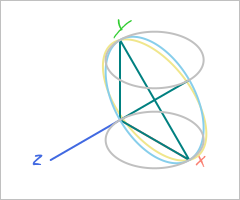
Back to the isometric arc calculator! The objective here was to try and get cplane to generate arcs at a 45° angle (in the isometric world; it's technically 60° in the picture plane) down from the x-z plane. The yellow line is my current best attempt to do it via cplane, while the blue line cheats by using the knowledge of isometry to place a 2d ellipse at an angle of 60°.

A cylinder with a blue arc cutting through it at a diagonal.  A yellow arc also cuts through it, but imperfectly.

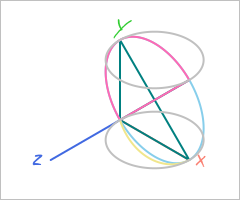
Actually, while writing this, I remembered something about my arc calculator. Let me go check that real quick.

The same cylinder from before, but a magenta semicircle arc perfectly cuts through out from the horizontal axis.

Okay, so arcs sprouting out from the horizontal are perfect in cplane as is, but fourths, and half arcs sprouting out from the vertical/diagonal do not.

Day 7

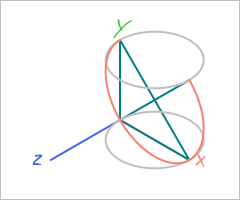
I realized that since I had already worked out how to place an ellipse in the 2d picture plane to demonstrate the desired arc, I could just turn that math into a function and use it instead of debugging the 3d math. This new function, fplane (the 'f' stands for fake), is less capable than cplane but can produce the quarter and semi-ellipse arcs in the diagonal.

A salmon colored arc demonstrates three fourths of an ellipse sitting in the diagonal of a cylinder.

Given that fplane requires no loops and no quantization (cplane uses 36000 points around the ellipse for running calculations), I'm curious to see how far I can push it. The current parameter list includes the opposite vertex, one covertex, and fraction of a semi-ellipse to draw; so as is I can't do partial arcs that start off of the vertex. Expanding the parameter list to, say: vertex1, vertex2, covertex, startingpoint, fraction of semi-ellipse; might work, but that remains to be implemented.

Passing 3d space radii as parameters isn't going to be feasible, as the two vertices are immediately projected isometrically into 2d space, and then the 2d ellipse is drawn via those coordinates (the radii are calculated in the picture plane, bypassing the need to know angles of oriention in 3d space).

// Function for projecting an arbitrary 3d coordinate into the isometric 2d plane.
function project_xyz(dx,dy,dz) {
	return [Math.cos(30 * (Math.PI/180)) * (dx - dz), dy + (Math.sin(30 * (Math.PI/180)) * (dx + dz))]
}

Day 8

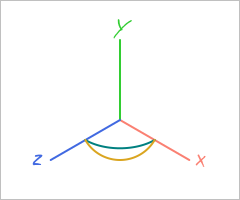
I attempted to work fplane into my current project, and immediately ran into the (in hindsight) obvious issue. fplane can only produce valid ellipses when the angle in the visual plane between the vertex and the covertex is 90°. Here, cplane/hplane generate the correct, teal, arc, while fplane produces an arc that goes lower/further out than it should (in yellow).

Two arcs, one that appears to be angling lower than it should.

At this point, it's back to the drawing board?

Day 9

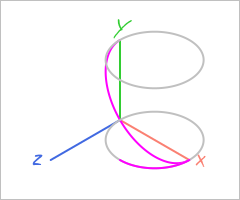
Taking all that I have learned from hplane, cplane, and fplane; I have developed ncurve (the 'n' stands for 'nice'). Initial testing is promising, showing that it can produce fplane curves as well as hplane curves (magenta curves in the image).

Two curves, one showing one fourth of a circle in the x-z plane, and the other reaching diagonally in a semi-ellipse.

Rather than taking the starting point as a vertex (fplane and cplane), or passing an "offset angle" to correct for when your starting point isn't the vertex (cplane and hplane), neither the starting point nor the ending point are used in the calculation of the ellipse. Instead, two cylindrical coordinate vectors (heading, rho, altitude) are provided to define the 3d radii.

While I would like to find a way to do this stuff without iterating through 36000 points around the ellipse, ncurve's implementation isn't that much more complicated than cplane:

  1. Generate 36000 points of an ellipse with given radii in the x-z plane
  2. Rotate the points about the x axis by the "roll angle" (the angle between the rho and altitude of the covertex, corrected to account for the vertex heading)
  3. Rotate the points about the z axis by the "lift angle" (the angle between the rho and altitude of the vertex)
  4. Rotate the points about the y axis by the vertex heading
  5. Project the points into isometry
  6. Find the nearest and furthest apart opposite points for our new 2d radii
  7. Calculate 2d rotation based on furthest apart opposite points coordinates

Day 10

Today I sourced a look-alike font for a font from the cover of a book I recently finished. Bodoni Moda looks nice and is pretty darn close.

I also collected the artwork for every music album I either purchased or was gifted this year. (But omitted any albums I obtained for free through a service my employer subscribes to.) My intention is to put the 12cm squares up on a bedroom wall for some decoration.

I also kicked around the idea of making a luni-solar calendar with the day I started HRT as its epoch. This turned out to be quite complicated to bang together. I currently can determine the year number given a gregorian date, but months remains elusive.

Day 11

When uploading images to this site, I try my best to compress them beforehand. I wanted to test and see if there are better methods out there than what I'm currently doing.

My current approach is to load the image into Macromedia Fireworks MX 2004, and then export with the "JPEG - Smaller File" setting: 60% quality, smoothing level 2. There's also "JPEG - Better Quality" (80% quality, smoothing level 0), but I don't use it.

For this test, I'm using two images I've previously uploaded to this site, with resolution 4032x3024 pixels. I don't like resizing them down if I don't have to, so I put a lot of trust in the compression.

Compression UsedFile 1File 2
(None)4.9MB4.1MB
Guetzli [Default] (95% Quality)x3.5MB
Macromedia Fireworks [JPEG - Better Quality] (80% Quality)2.8MB2.3MB
Guetzli (85% Quality)x2MB
ImageOptim (80% Quality)2MB1.7MB
Squoosh MozJPEG [Default] (75% Quality)1.74MB1.50MB
Python jpeglib (60% Quality, 20% Smoothing Factor)1.7MB1.4MB
ImageMagick CLI (-strip -gaussian-blur 0.05 -quality 60%)1.3MB1.1MB
Squoosh MozJPEG (60% Quality)1.24MB1.07MB
Squoosh MozJPEG (50% Quality)1.05MB903KB
Macromedia Fireworks [JPEG - Smaller File] (60% Quality, Smoothing Level 2)744KB951KB
Squoosh MozJPEG (40% Quality, 57% Smoothing, MSSIM-Tuned Kodak)743KB664KB

I only ran Guetzli on File 2, because the runtime for compression is over 8 minutes.

And for some non-jpeg comparison:

Compression UsedFile 1File 2
avifenc (60% Quality)2.2MB1.4MB
Squoosh WebP [Default] (75% Quality, 4 Effort)2.03MB1.35MB
Squoosh WebP (75% Quality, 6 Effort)1.81MB1.24MB
Squoosh WebP (50% Quality, 6 Effort)1.21MB830KB
Squoosh Avif (50% Quality, 7 Effort)1.24MB786KB
Squoosh Avif [Default] (50% Quality, 4 Effort)1.19MB767KB

I realize that quality percentages can be weird sometimes, so I went to check if the Fireworks files are really doing 60% and... ImageMagick reports 68% quality. Their smoothing algorithm must be doing some wild heavy lifting.

Day 12

Today I mainly focused on using ncurve in my current project.

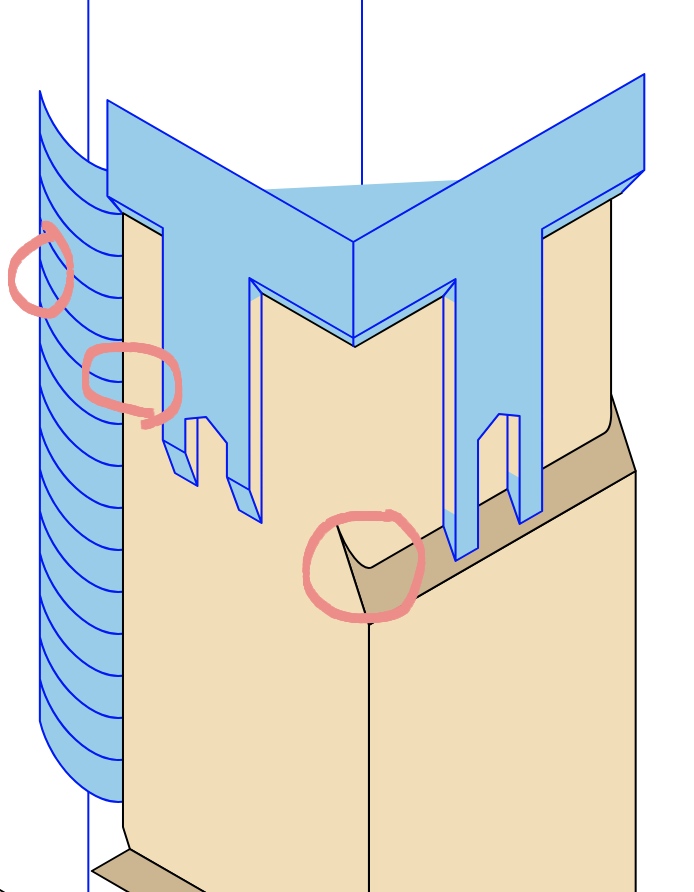
A tower with a round structure next to it.  Parts of the round structure are circled, and the south face of the tower has a curve circled.

I'm happy with the performance of the arc generator on the tower itself, despite the slight discontinuity/too sharp of a turn when transitioning from a straight line.

As for the other curves present in the image, I have some concerns. I'm not totally sure if I've math'd out the arcs in 3d space correctly, which could be contributing to the issue, but the arc just feels like it's curving too much on the side facing the tower versus the side facing away. That arc should be 135° about the y axis, plus or minus, and should be sloping up from the x axis at 43° (I think - that's a part of the math I'm not certain on).

Day 13

Dealing with those curves got just a little bit too frustrating, so I'm taking a break from them (by facing another curve problem). As a part of my SVG artwork process, I not only have my isometric arc calculator, but also a text typesetter: it outputs the paths for the letters directly, rather than relying on the <text> element.

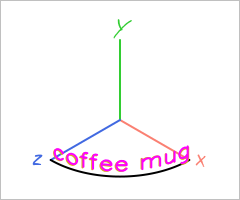
I finally thumbnailed page 6 for my webcomic, and one of the elements present is a coffee mug with lettering on it. While I could try and draw out the letters myself, wouldn't it be neat if I could adapt my existing typesetter to do it for me?

The naive approach was to rotate by some number of degrees between each letter (in isometric perspective, of course):

Text wraps into a quarter of a circle, though imperfectly.

And honestly, that doesn't look too bad! Guess-and-checking the "between" angle lends an approximation of the desired curve.

The proper way to do this would be to establish a curve, and the use the length of each letter to adjust the "between" angle so that it perfectly (though quantized) follows the curve. Whether I end up doing that depends on if the text I put on the mug looks fine as is!

Day 14

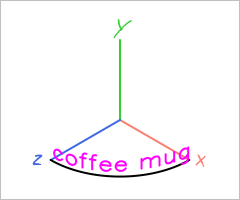
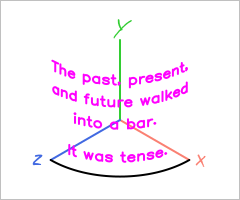
As it turned out, I was not rotating once-per-letter, but once per path command (m, l, a, c, v, h, etc). While that did technically mean that the letters were warped into the curve, stacking lines of text on top of each other was impossible. Having corrected that, it looks about the same.

Text wraps into a quarter of a circle, correctly this time.  New algorithm in magenta, old imperfect algorithm in goldenrod.

And stacked lines of text look nice!

Text curved into a quarter of a circle, saying: The past, present, and future walked into a bar.  It was tense.

Day 15

One of the small language learning things I do each year is add a "words of the day" script to my ~/.zshrc for a target language, so that opening a terminal window shows new vocabulary. I typically try to use a frequency list as the word list (so that the most common words pop up in January), and then source the definitions from a few sources.

For 2026, I've obtained A Frequency Dictionary of Spanish [2nd Edition] (2018), Mark Davies and Kathy Hayward Davies; which has both the frequency and the definitions all wrapped up in one source. They also include on disc/online TSV files containing the entire dictionary, which makes scripting my "words of the day" thing incredibly easy. The files are in the UTF-16LE encoding (0xFF 0xFE header), which my terminal didn't like, but converting it to UTF-8 via iconv resolved the issue.

#!/bin/zsh

# to get a prior day's words, call with parameter how many days ago
if [ $# -eq 0 ]; then
	offset=0
else
	offset=$1
fi

daycount=$((10#`date +%j` - $offset))

# get three words per day
es_words=$(
	head -n $((2 + $daycount * 3)) searchable_spanish_utf8.tsv | tail -n 3
	)

echo "==="
echo "Here are your Spanish Words of the Day"
echo "(Day $daycount)"
echo "==="

# This line only works as expected under zsh - it prints empty values under bash
echo $es_words | awk -F '\t' '{print $2" ("$3"): "$4"\n   Sample Sentence: "$5"\n   Translation: "$6}'

echo "==="

Example output if run on January 1st:

===
Here are your Spanish Words of the Day
(Day 1)
===
el,la (art): the (+ m, f)
   Sample Sentence: el diccionario tenía también frases útiles
   Translation: the dictionary also had useful phrases
de (prep): of, from
   Sample Sentence: es el hijo de un amigo mío
   Translation: he is the son of a friend of mine
que (conj): that, which
   Sample Sentence: dice que no quiere estudiar
   Translation: he says that he doesn’t want to study
===

Edit: Don't put it in your ./zshenv, or the shebang line will loop infinitely. Put it in your ~/.zshrc instead. This wasn't an issue for this past year's script because I used a bash shebang line.
Day 16

No adventuring.

Day 17

While I call my typesetter a typesetter (and under the hood that's what it is), I've certainly used it for more in the past, and intend to continue this trend. Since I've already written something that can project a 2d vector into isometry, why would I rewrite it?

For example, in my drawing of the Arc de Triomphe de l'Étoile, the detailed sculptures and friezes are letters of an SVG font.

Inkscape UI set to SVG Font Editor, Glyphs, showing the letter 'p', which is the south-east top frieze of the Arc de Triomphe.

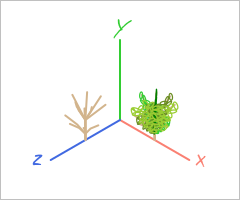
I wanted to take this a step further. PSX-style vegetation is often just a textured rectangle duplicated and rotated around its center a few times. Would it be possible to adapt this technique to my typesetter to enable dropping vegetation into my isometric drawings?

I only recently got out from work, so I'm still turning code-in-my-head into code-that-runs-on-the-computer. I'll update this entry with my result at some point before the day ends.


Okay, here's today's attempt:

Two shrubs: one leafless (only stems), and one covered in folliage (though the colors aren't ideal).

The stem-only shrub looks passable; the shrub with folliage is rough. The inability to change stroke color mid-path is going to make creating convincing folliage a concern, I think. Additionally, I overestimated how much rotating the planes would cover up the "2d-ness" of it all.

Day 18

Discovered that my typesetter can't do vertical type. Had no time to fix it though, because I was pushing to get page 6 of my webcomic done in time to post it by midnight.

I did improve the "dark mode" of the theme by changing the non-body background color. This might end up in the main branch of quick-static-webcomic. I found a workaround for the issue of semicolons causing quick-static-webcomic to error out, but it's not a great solution.

Day 19

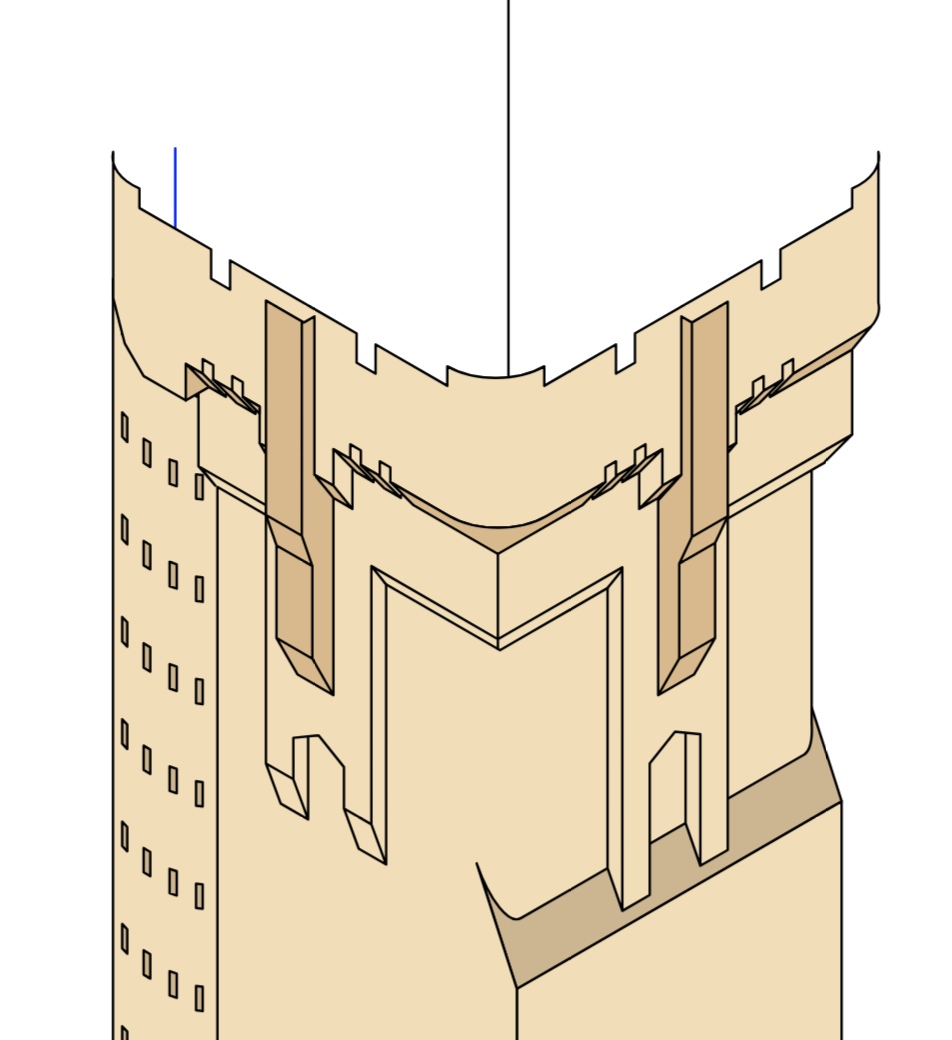
I think I've narrowed down why the arc calculator is behaving weirdly for the arcs from Day 12, but given that there's a deadline to finish this commission - I'm skipping those arcs and just doing windows! Still technically accurate, if a bit more stylized.

A tower with the start of a top platform with bartizans present.